
Read usage and activity
Use the daily graph and activity totals to understand a service over time.
Before you start
- Access to a service
Choose the billing month
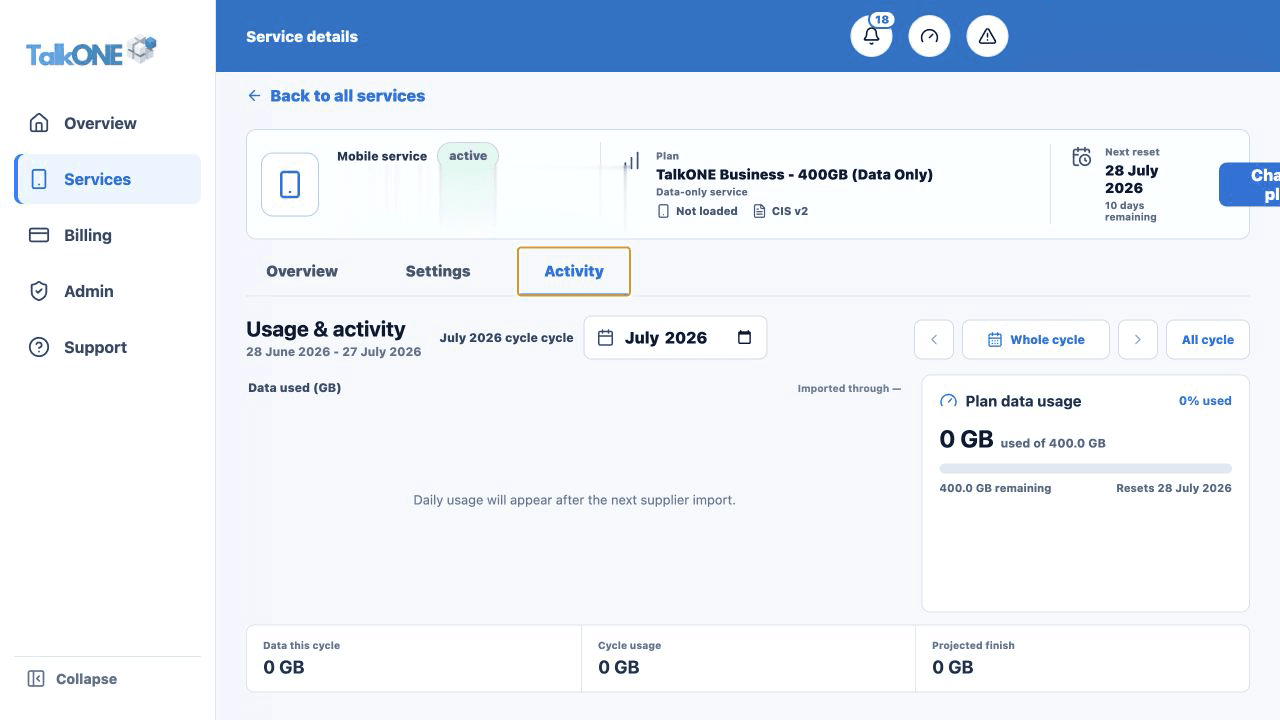
Open the service's Usage & activity tab and select the cycle you want to review.
Use the highlighted billing month selector on the Usage & activity screen. Confirm the surrounding service or account details match before you continue.
Read the daily graph
Each bar represents data imported for that day. Gaps after the latest import date do not mean zero usage.
Use the highlighted daily usage graph on the Usage & activity screen. Confirm the surrounding service or account details match before you continue.
Compare with the allowance
Use the usage summary beside the graph to see the share of allowance and DataBank used.
Use the highlighted plan data usage summary on the Usage & activity screen. Confirm the surrounding service or account details match before you continue.
Review the activity totals
Calls, SMS and data totals are consolidated below the chart for a quick cycle summary.
Use the highlighted cycle activity totals on the Usage & activity screen. Confirm the surrounding service or account details match before you continue.
Check your work
The chart heading shows the selected billing period and the most recent import date.