
Create and track a support request
Ask for help, include useful details and follow the request through to completion.
Before you start
- A portal login
- The affected service number or invoice reference
Do not include passwords, verification codes, full card numbers or bank credentials.
Open Support
Choose Support and start a request. Select the closest request type so it reaches the right workflow.
Use the highlighted Create request on the Support screen. Confirm the surrounding service or account details match before you continue.
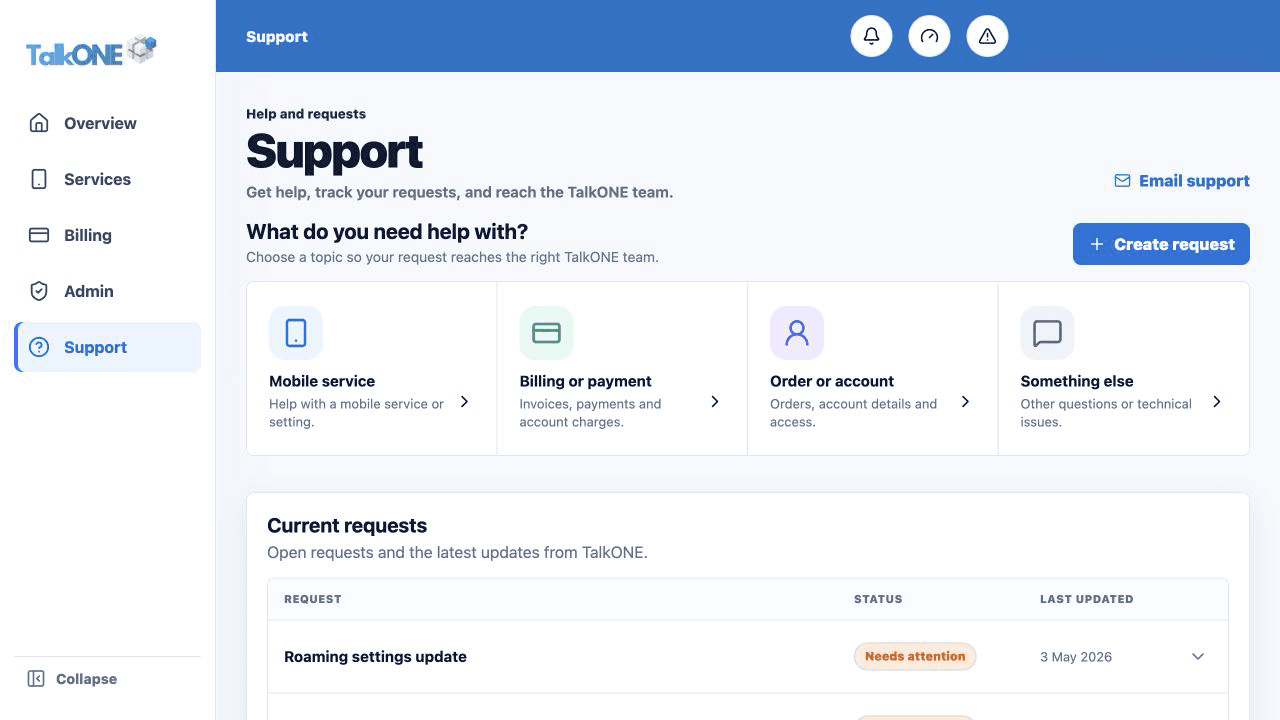
Add useful context
Include the affected number, invoice or order, what you expected, what happened and when it started.
Use the highlighted request topic on the Support screen. Confirm the surrounding service or account details match before you continue.
Submit and keep the reference
After submitting, the request appears under Current requests and a confirmation email is sent.
Use the highlighted Current requests on the Support screen. Confirm the surrounding service or account details match before you continue.
Read updates
Expand the request to see customer notes, status and TalkONE updates. Completed and closed requests move to Recent history.
Use the highlighted Needs attention status on the Support screen. Confirm the surrounding service or account details match before you continue.
Check your work
A request reference and status are visible in Support.