
Request a physical SIM
Request manual help when a device or use case requires a physical SIM.
Before you start
- The mobile number or new service requirement
- A delivery address
- Device details
Open Support
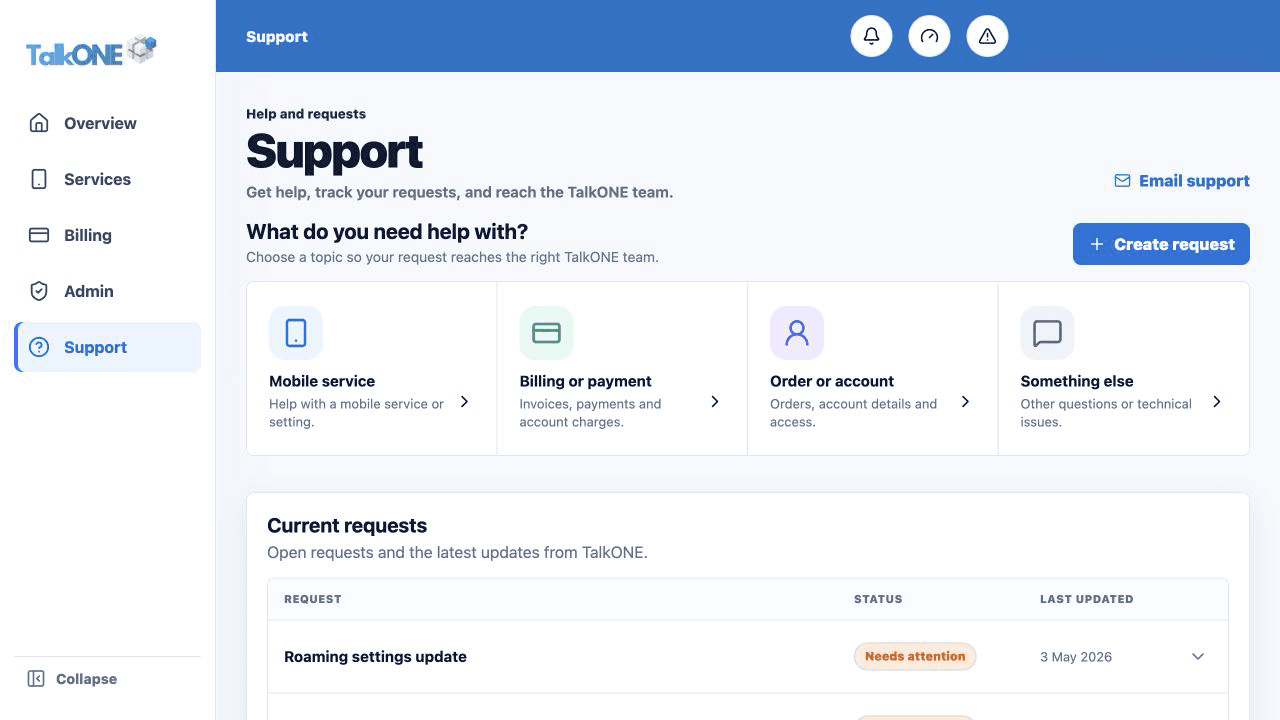
Choose Support and start a new request.
Use the highlighted Create request on the Support screen. Confirm the surrounding service or account details match before you continue.
Select the SIM request type
Explain whether this is for a new service, damaged SIM, lost SIM or device replacement.
Use the highlighted request topic on the Support screen. Confirm the surrounding service or account details match before you continue.
Provide the delivery details
Include the recipient, delivery address and device make/model. Do not include payment details in the request.
Use the highlighted Create request on the Support screen. Confirm the surrounding service or account details match before you continue.
Track fulfilment
The request appears under Current requests. TalkONE will confirm the SIM serial and activation steps.
Use the highlighted Current requests on the Support screen. Confirm the surrounding service or account details match before you continue.
Check your work
A support reference is visible and a confirmation email has been sent.